



 +31 20 820 3777
 Support
  Documentation
 Login
Login 



VNC (Virtual Network Computing) is a system that connects to a remote computer via the RFB (Remote FrameBuffer) protocol. This protocol allows multiple simultaneous user sessions.
Why Apache Guacamole?
The first implementation of our solution required us to activate remote-control port forwarding and open the DARC console via VNC using a special button. Then you had to wait for the console.vv file to load and open it, all this only after having already installed the Virtual Machine Manager tools tools on the local computer. This method is not overly complicated, but it is inconvenient for users and has led to errors when working with rented equipment.

Example of a file: console.vv
[virt-viewer]
type=vnc
host=HOST_IP
port=5906
password=3dB2h1Ey/gTb
# Password is valid for 120 seconds.
delete-this-file=1
fullscreen=0
toggle-fullscreen=shift+f11
release-cursor=shift+f12
secure-attention=ctrl+alt+end
versions=rhev-win64:2.0-160;rhev-win32:2.0-160;rhel7:2.0-6;rhel6:99.0-1
newer-version-url=http://www.ovirt.org/documentation/admin-guide/virt/console-client-resources

[ovirt]
host=localhost.localdomain:443
vm-guid=0ecc8183-b0a9-4a95-b045-1967acf2dab7
sso-token=sG6zUyrXT0X8qOkCWoVL_vWLcYTPQfo2hqHrH1AHvXPz4G9PofFlqarEFXcH9bizILPufhF_2KghkD-o5Qxktw
admin=1
To make life easier for our users, we needed to implement a direct launch of the HTML5 web console from the Client Area without requiring the user to install Virtual Machine Manager tools tools. For this, we chose Apache Guacamole - a free cross-platform remote desktop gateway that supports all popular protocols and technologies: Telnet, SSH/SFTP, RDP, Kubernetes, as well as VNC (RFB). An important advantage of Apache Guacamole - it does not require installing client programs or special plug-ins. The user gains access to hardware management from their browser with a single click in the Client Area:

How does it work?
You can activate the console not only in the browser, but also by curl-request directly to our API:
curl -s "https://invapi.hostkey.com/eq.php" -X POST \
--data "action=novnc" \
--data "token=SESSION_TOKEN" \
--data "id=SERVER_ID" \
--data "pin=PIN_CODE"
Example of an answer:
{
"result":"OK",
"scope":"https://rcnl1.hostkey.com:8443/guacamole/#/?username=USER_NAME&password=PASSWORD",
"context":{"action":"novnc","id":"14494","location":"NL"},
"Debug":"debug",
"Key":"36ecafa60a13fd8000dcca73fd9528f5"
}
The user has to wait for the console to load, but on the service side the process looks more complicated. As an example, let's look at calling the VNC console in a browser.
The general scheme of calling the VNC console in the browser from the Client Area:
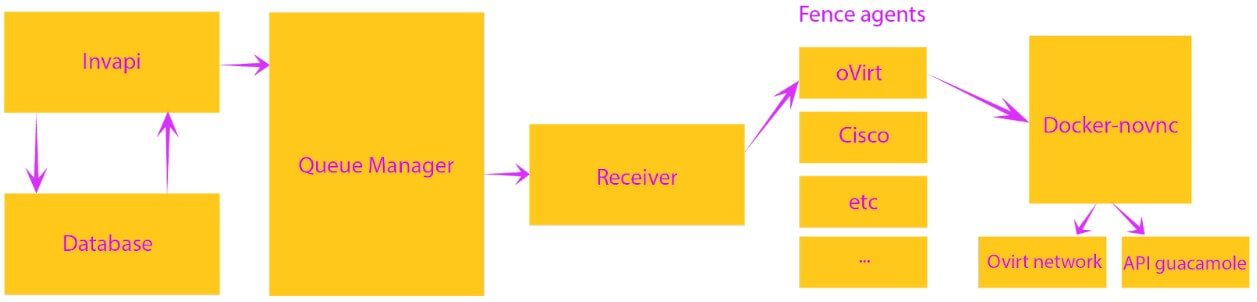
When requesting via Invapi, a command is given to the API to open the console of a particular server via a message broker cluster (RabbitMQ). To do this, just send the server number to the message broker.
RabbitMQ transfers server and task data to an auxiliary service receiver created by our experts. The receiver takes the data in RabbitMQ, transforms all the necessary information, splits the tasks (e.g. oVirt, Cisco, IPMI, etc.) and sends them to the fence agent.
To manage virtual machines via API or web interface, we chose oVirt. The system uses the KVM hypervisor and is based on several projects, including libvirt, Gluster, PatternFly and Ansible. It's quite easy to use and highly reliable. Our experience with integrating oVirt into a production infrastructure will be discussed in more detail in a separate article.
Structure of the oVirt fence agent:
inputRawURLConsole := inputRawURL + "/vms" + "/" + vm.MustId() + "/graphicsconsoles" + "/" + Vnc
//
……..
//
url := noVncURL + url + "/skey/" + *key + "/id/" + *name + "/ovirt/pass/" + passwd_encode + "/port/" + port + "/location/" + *location1

item := APICallBack{Result: "OK", Debug: "debug"}
item.Message = string(body)
jitem, err := json.Marshal(item)
if err != nil {
	fmt.Println(err.Error())
	return
}

fmt.Println(string(jitem))
Fence agents correspond to the types of hardware used in our infrastructure. They access the server with docker-novnc, which has access to the oVirt network. The agent loads the console and fetches the necessary host parameters (IP and password), then decodes the received data and sends a request to the noVnc API via the oVirt router, where data exchange with the Guacamole API takes place. The agent sends a GET request to the server, which contains the IP address and server ID, as well as the session token for the server.
Request structure:
r.Get("/{id}/skey/{key}/id/{uid}/ovirt/pass/{upass}/port/{uport}/location/{uloc}", StageHandler)Once the request has been processed, the client has access to control the equipment via the VNC console.
Example of an open console for Windows:

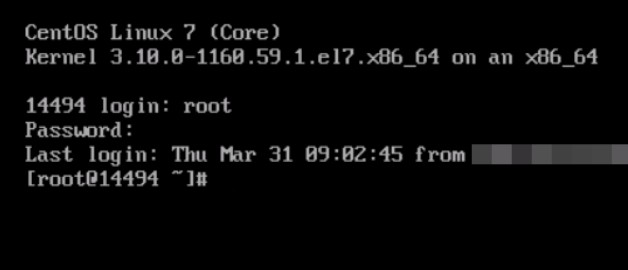
Example of an open console for CentOS:
The problem with hotkeys
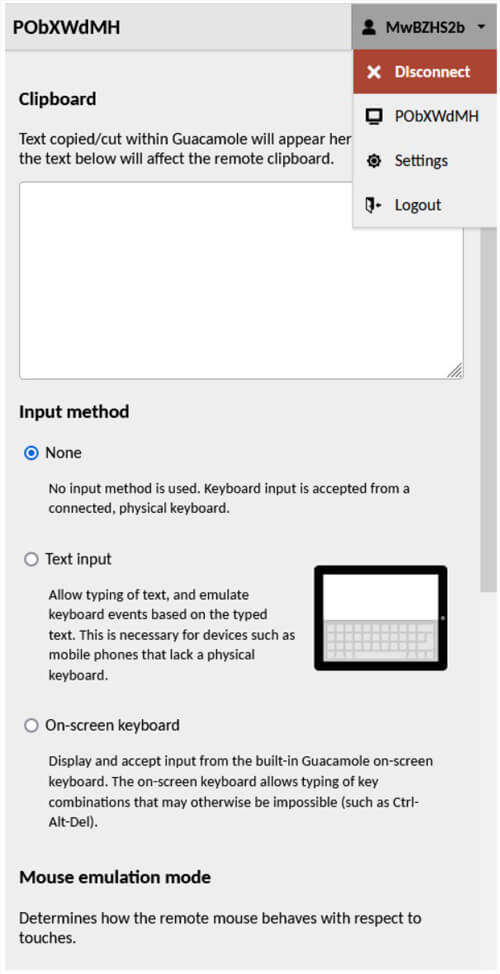
Certain key combinations cannot be pressed in the web application because they are reserved by the OS (e.g. Ctrl-Alt-Del or Alt-Tab) or by the browser. This problem can be solved by calling the Apache Guacamole navigation menu with the Ctrl-Alt-Shift key combination (you can hide the menu by pressing the combination again). There you can select the input method (text, on-screen keyboard), enable mouse emulation mode, select the language and time zone, and close the work session.

The English-language version of the Navigation menu:
The console remains active for two hours, after which the session is automatically closed and the login must be repeated.
Conclusion
Using Apache Guacamole simplifies the management of server hardware from different vendors. In the future, we plan to develop a solution to avoid automatic closure of the console after two hours.